
 .
.Connecting to Other Devices

Wired Remote Control Connection
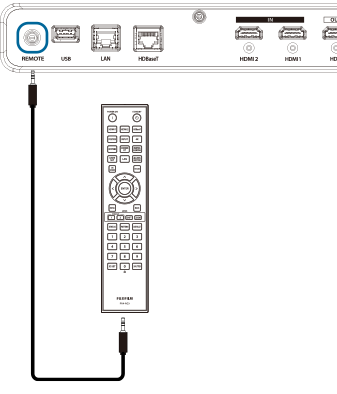
Connect the remote output terminal of the remote control to the remote input terminal of the main unit using a commercially available 3.5mm stereo mini-plug cable.
d Caution
- Operation is not guaranteed in all Connection environments.
- When the remote output terminal is used, infrared signals are not emitted from the remote control.
- The Remote Receiver on the main unit remains On.
To turn it Off, set it to Off in a system setup: basic/remote receiver.
Connecting to HDBaseT-Compatible Transmission Devices (Commercially Available)
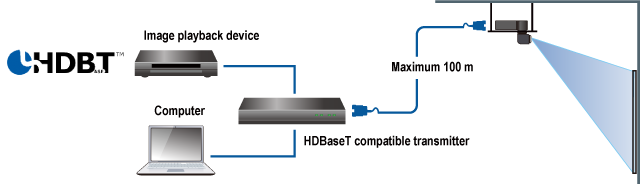
When connecting to a commercially available HDBaseT-compatible transmission device, connect to the HDBaseT terminal.

connection diagram
b Note
- By setting Control Channel to HDBaseT in system setup: advanced LAN settings, LAN communications using the HDBaseT terminal are possible.
d Caution
- Use a shielded STP cable of category 5e or higher for the Cat cable.
- The maximum transmission distance possible with a Cat cable is approximately 100 m.
- The HDBaseT terminal on this unit supports transmission devices compatible with serial communication and IR.
To Enable IR via HDBaseT, set HDBaseT to On in asystem setup: basic/remote receiver. - This unit is not guaranteed to operate with all commercially available HDBaseT-compatible transmission devices or in all connection environments.
Connecting to LAN-Compatible Devices
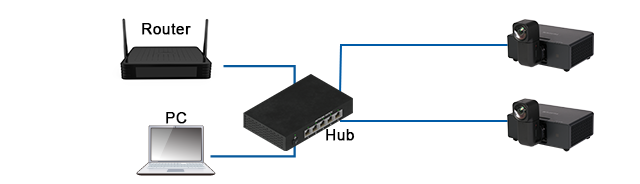
When connecting to a LAN-compatible device, use a commercially available LAN cable to connect to the LAN terminal.

connection diagram
d Caution
- The LAN terminal will be disabled if the Control Channel is set to HDBaseT in system setup: advanced LAN settings.
- This product cannot be connected directly to the communication lines of telecommunications carriers (mobile communications companies, fixed-line communications companies, internet service providers, etc.). When connecting this product to the internet, be sure to connect via a router or similar device.
Connecting to HDMI-compatible devices
When connecting to an HDMI-compatible device, use the HDMI terminal.

b Note
- The HDMI OUT terminal can be switched between HDMI1/HDMI 2 in the OUTPUT Setup of the a input menu.
d Caution
- When inputting or outputting 18Gbps transmission video such as 3840×2160 60p 4:2:2, please use a compatible HDMI cable.
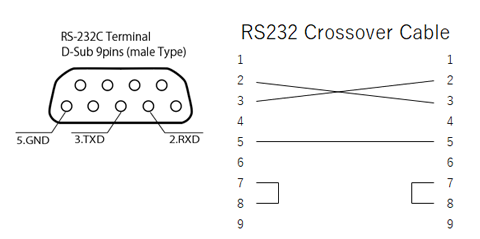
Connecting to the RS-232C Terminal (Serial Port)
When controlling this unit via RS-232C, connect to the RS-232C terminal.
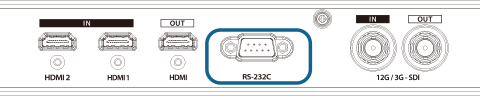
Pin Assignment
b Note
- Use a commercially available crossover cable to connect to a PC or other device.