
 .
.SOURCE
Configures settings related to input.
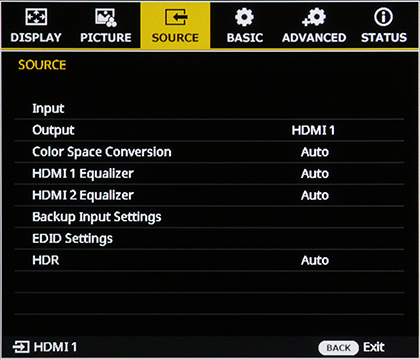
Input
Choose an input source.
| Setup | |||
|---|---|---|---|
| HDMI1 | HDMI 2 | HDBaseT | 12G-SDI |
Output
Choose an output source.
| Setup | |
|---|---|
| HDMI1 | HDMI 2 |
Color Space Conversion
Choose the color space in which images are displayed.
| Setup | ||||
|---|---|---|---|---|
| Auto | RGB(0-255) | RGB(16-235) | YUV | REC709 |
HDMI 1 / HDMI 2 Equalizer
Adjusts for stable signal transmission when using long HDMI cables. Adjust the settings according to your usage conditions.
| Setup | |||||||
|---|---|---|---|---|---|---|---|
| Auto | 1 | 2 | 3 | 4 | 5 | 6 | 7 |
Backup Input Settings
The projector can automatically switch to a backup Input Signal if the primary Input Signal becomes unavailable. (The PICTURE signals from both input ports must be identical.)
Press ENTER to display options and then select the desired item.
Auto Switch
Enables or disables the input signal auto switch.
| Setup | Description |
|---|---|
| On | Enables input signal auto switch. |
| Off | Disables input signal auto switch. |
Current Signal
Displays the Current Input Signal (view only).
First Input / Second Input
Choose first and second input.
| Setup | ||
|---|---|---|
| HDMI1 | HDMI 2 | HDBaseT |
Input Info.:
Displays the Current Input Signal, Backup Input Status, backup input operation status, and input signal details.
The Backup Input Status allows you to identify whether Auto Switch is actually available.
EDID Settings
Sets the EDID version supported by each input port.
Press ENTER to display options and then select the desired item.
HDMI 1 / HDMI 2 / HDBaseT EDID Settings
| Setup | ||
|---|---|---|
| 2.0 | 1.4 | Custom |
b Note
When set to Custom, the factory default is the same as 2.0. To change the content, ayou must upload an EDID information file via the web control function.
HDR
Sets the HDR function.
| Setup | Description |
|---|---|
| Auto | Automatically detect HDR signal. |
| Off | Turns the HDR function Off. When set to Off, the projector cannot display HDR signals. |