
 .
.Safety Precautions
For Your Safety
The d Warning and d Caution indications in this document represent the following:
| d Warning | Failure to observe warnings could result in death or serious injury. |
|---|
| d Caution | Failure to observe cautions could result in injury or property damage. |
|---|
This section lists important precautions that must be followed to ensure safe and correct use of the product. Read them before using the product and observe them during use.
d Warning
- Be sure the product is installed securely. Serious accidents could result should the product fall from a height.
- Mounting the product on a ceiling (Ceiling Mount INSTALLATION) must be performed by professional technicians with specialized skills. "If installed incorrectly, the product could fall, potentially causing a serious accident."
- When working in high places, always work with at least 2 people and ensure physical safety by using a safety line or other protective measures. "Slipping, falling, or loss of balance could result in serious accidents."
- "When installing the product in high places, ensure that people below keep their distance." Falling objects could cause serious accidents.
- Do not install or use the product in a bath or shower. Failure to observe this precaution could result in fire or electric shock.
- Do not handle the product with wet hands. Failure to observe this precaution could result in electric shock.
- "Do not modify, tug, or twist the power cables, subject them to excessive heat, or place them under heavy objects." Damage to the cables could result in fire or electric shock. "Should the cables be damaged, contact a Fujifilm-authorized service technician." Keep the cables clear of the intake and exhaust vents.
- Do not use cables if their connectors have ever been bent.
- Do not place the product on unstable surfaces. Be sure the product is level. Injury could result if the product tips or falls.
- Do not touch the metal parts of the product during thunderstorms. Lightning strikes can produce induced current that could cause electric shock.
- "Do not place vessels containing water, chemicals, or other liquids on the product." Liquid that finds its way into the product could cause fire or electric shock.
- Never look directly into the lens while the product is on. The bright light could cause visual impairment or other injury. "Do not look into the lens with magnifying glasses, telescopes, or other optical instruments."
- "Do not insert flammable material, metal, or other foreign objects into the product or leave them in its vicinity." "Failure to observe this precaution could result in fire, burns, or electric shock."
- Do not use sprays containing flammable gas to remove dust or other foreign matter from the lens. "The gases could ignite, causing fire."
- Do not use the product in locations where the air may contain flammable or explosive gases. "The gases could ignite, causing fire."
- Do not place flammable objects in front of the lens. Failure to observe this precaution could result in fire.
- "Do not block the light from the product with books, cloths, or other objects." "Objects placed in the beam could become hot, potentially melting or causing burns or fire." "Light reflected from the objects could also cause the lens to overheat, causing product malfunction."
- Do not touch the lens or metal parts of the product while it is on or immediately after it has been switched to standby. Failure to observe this precaution could result in burns or other injury.
- Be careful not to drop the product when lifting it.
- If an abnormality occurs, switch the power supply to the standby state (Standby) and disconnect the power cable. "Continuing to use the product when it is emitting smoke or unusual smells or otherwise functioning abnormally could result in fire, electric shock, or visual impairment."
- Use only the supplied power cable. Using other cables could cause overheating or an electrical short leading to fire or electric shock. Failure to properly ground the outlet to which the supplied power cable is connected could also result in electric shock.
d Caution
- Use the product only as described in this manual.
- The product and its accessories are precision devices. Under no circumstances should they be subjected to excessive force.
- When the product will not be used for an extended period, perform Mounting of the front lens cover on the Lens.
- The lens includes moving parts: do not apply excessive force or subject the lens to physical shocks.
- Do not install the product in locations with high humidity or dust, or in areas subject to oily smoke, steam, or vapors, or near heat sources. Using the product in these environments may cause malfunction, fire, or electric shock. Furthermore, oil can cause the resin casing to deteriorate, which may damage the mounting or support sections and lead to the main unit falling.
- Do not leave the product in locations where it will be exposed to high temperatures or direct sunlight. Failure to observe this precaution could result in fire.
- "Do not leave the product or, if the batteries are inserted, the remote control unattended in locations exposed to direct sunlight or high temperatures, for example directly in the path of warm air from a heater." "Excessive heat could deform the casing or damage the product's internal parts, resulting in fire."
- Do not place heavy objects on the product. "The objects could become unbalanced and tip or fall, causing injury."
- Do not use the power cable if the plug is damaged or does not fit securely into the socket. Failure to observe this precaution could result in fire or electric shock.
- "Keep your face and hands, as well as objects that may be warped or otherwise damaged by heat, away from the exhaust vent while the product is in use." The hot air from the vent could deform the objects or cause burns or accidents.
- "For safety, be sure to unplug the product when it is not in use." Failure to observe this precaution could result in fire due to deterioration of the insulation or other causes.
- Before transporting or cleaning the product, always switch the power supply to the standby state (Standby), unplug it from the power outlet, and disconnect all cables. Failure to observe this precaution could result in fire or electric shock.
- "When cleaning the product, do not use damp cloths or solvents such as alcohol, benzine (petroleum ether), or thinner." "Water could enter the product or the casing could weaken and break or suffer other damage, potentially resulting in electric shock."
- The accumulation of dust inside the product could result in fire or malfunction. We recommend that the interior of the product be periodically inspected and cleaned. Contact the original retailer for these services.
- Do not lift the product by the lens. This may cause a malfunction.
- When using the product at high altitudes (above approx. 1,500 m), set High Altitude Mode to "On" to ensure that the System Temperature is correctly adjusted. Failure to observe this precaution could shorten the life of the product's parts.
- Abnormalities such as smoke or unusual odors could lead to serious accidents, including fire, electric shock, or vision impairment. Immediately stop use, turn off the power supply, and consult your dealer.
- Do not drop water or foreign objects into the product. Should water or other foreign matter enter the interior, switch the power supply to the standby state (Standby) and unplug it from the power outlet. Continued use could result in a short circuit causing fire or electric shock. Consult the original retailer.
- Do not disassemble or modify the product (never open the case). Failure to observe this precaution could result in fire or electric shock.
- Keep small parts out of the hands of infants and pets. "Because of their size, small objects such as batteries from the remote control may be accidentally swallowed by infants or pets." Keep small parts out of their reach. "Should an infant swallow any part of the product, consult a physician immediately."
- Keep safety in mind when stringing cables. Failure to observe this precaution could result in falls or injury.
- Do not install the product in locations subject to shock or vibration.
- Do not touch the lens immediately after switching the product to standby. Failure to observe this precaution could result in burns or other injury.
- Be sure the product is properly grounded.
- The plastic bags provided with this product present a suffocation risk when placed over the nose and mouth. Store them out of reach of infants and young children.
Precautions for Storage and Use
- Do not use or store the product in locations subject to extreme temperatures. Avoid locations that are subject to sudden changes in temperature. Operate and store the product within its operating and storage temperature limits.
- Do not install the product in the vicinity of high-voltage power lines or equipment that produces magnetic fields. The product may not function as expected.
- Do not use the product when it is tilted. Failure to do so may result in malfunction or accidents.
- Do not touch the lens with your bare hands. Fingerprints and smudges on the lens can affect picture quality. To keep the Lens clean and prevent scratches, attach the front lens cover when the product is not in use.
- Remove the batteries from the remote control before placing it in storage. Leaving the batteries in place for long periods could result in leakage or other damage to the batteries.
- Do not use or store the product in locations exposed to oily smoke or tobacco smoke.
Failure to observe this precaution could result in reduced picture quality. - Malfunction or damage resulting from natural disasters (such as fire, earthquakes, floods, or lightning), pollution, salt damage, abnormal voltage, or use of a power supply at non-specified voltages or Frequencies will be subject to chargeable repair.
- To clean the lens, first put the projector into standby mode (Standby) and confirm that the lens and metal parts have cooled. Use a blower to remove dust and lint, then gently wipe the lens with a commercially available cleaning cloth.
- "When transporting the product, hold it by its base." Do not hold it by the lens or the opening around the lens. Failure to observe this precaution could damage the product.
- "Thread-locking adhesive, lubricants, or grease on the ceiling mounts could cause the projector's plastic casing to deteriorate, potentially damaging the product or causing it to fall."
- Do not install or store the product where it will be exposed to salt damage or corrosive gases. Corrosion could damage the product or cause it to fall.
- When transporting the product, be sure to remove the Lens beforehand.
- When storing this unit, always ensure the adapter cap is attached.
Safe Use of Lasers
This product is classified as "CLASS 1 LASER PRODUCT – RISK GROUP 2" according to IEC 60825-1:2014, and further complies with 21 CFR 1040.10 and 1040.11. However, compliance as a Risk Group 2 LIP as defined in IEC 62471-5:Ed.1.0 is excluded. For advanced details, refer to "Laser Notice No. 57" dated May 8, 2019.
Projectors equipped with A22 and A23 Lens (throw ratio exceeding 2.4) may be classified as Class 1 Laser Product-Risk Group 3 (RG3); these are for professional use only and are not intended for general consumers. Operators must control access to the beam within the hazard distance (HD) or perform the INSTALLATION at a height that prevents eye exposure within the hazard distance (HD).
 |
IEC 60825-1:2014 CLASS 1 LASER PRODUCT |
This product is for professional use and is designed to project an IMAGE onto a wall or screen.
Be sure to observe the following warnings and cautions.
| Lens | Throw ratio | Classification and Requirements for Laser Illumination Projectors (LIP) | |
|---|---|---|---|
| FP-ZL034 | 0.34–0.41 | HD: N/A | IEC 62471-1: 2015 IEC 60825-1: 2014 CLASS 1 LASER PRODUCT RISK GROUP 2 |
| FP-ZL050 | 0.50–0.65 | ||
| FP-ZL125 | 1.25-2.00 | ||
d Warning
- This product contains a laser; do not open the case.
- This projector has built-in Class 4 laser module. Disassembly or modification is very danger- ous and should never be attempted.
- Bright light can cause visual impairment or other injury; do not look directly at the light source. "In the event that you do look directly at the light source, consult a physician as required."
- Never attempt to remodel or disassemble the projector. High voltages can cause fire or electric shocks.
d Caution
- Dispose of this product in accord with location regulations; do not disassemble.
- Use of controls or adjustments or performance of procedures other than those specified herein may result in hazardous radiation exposure.
-
"As with any bright source, do not stare into the direct beam, RG2 IEC 62471-5:2015."
- "Do not place your hands, face, or other objects in front of the projector lens while the projector is operating." Objects can become extremely hot, potentially resulting in fire or damage caused by the heat emitted from the Light Output Settings. Things placed in front of the lens may overheat and burn or start a fire.
- Do not spray flammable gas to get rid of dust and dirt that accumulate in the lens. Doing so could cause a fire.
Lens RG2

 Caution: Hot surface, do not touch
Notes on the Laser
"This product uses a laser as a light source, which has the following characteristics:"
- The light source may dim under certain conditions.
- "The higher the temperature, the more the source will dim."
- The source will grow dimmer the longer it is used.
- The relation between source brightness and length of use can be adjusted using brightness settings.
- "To prevent exposure to harmful laser light, consult an authorized service center should the projector require inspection, adjustment, or repair."
- The projector is equipped with a built-in laser module. Follow the instructions in the product manual when operating the projector or adjusting settings.
- Be sure to remove the front lens cover before turning the power supply on. The front lens cover may be damaged if left in place while the Projector power supply is On and the laser light source is active.
- Ensure that children do not stare into the projector light source.
- "Before turning the projector on, check to be sure that no one is standing in front of the lens."
- Do not use optical instruments such as telescopes or binoculars while the projector is in operation.
Laser Warning Stickers
The laser Warning label is affixed to the bottom/side of the product.
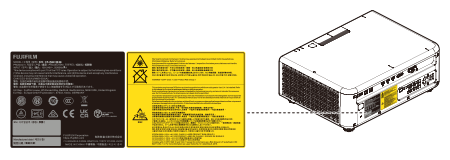
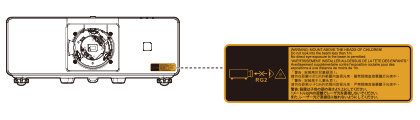
Rating label stickers
Product label (rating label) attached to the side of the product.
Specifications of Laser Source
FP-ZUH12000
- Wavelength: 455 nm
- Maximum output: 342 W